

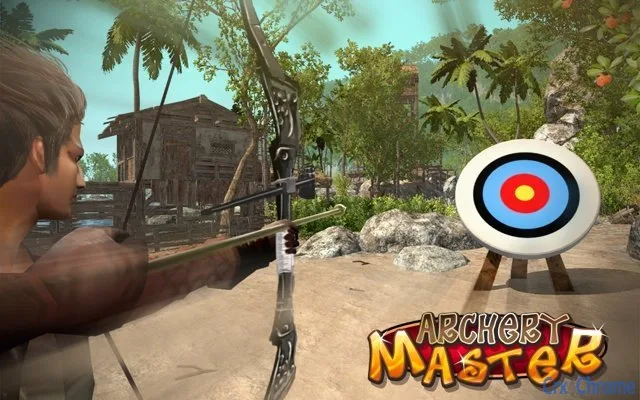
Description
Aim & Shoot: Wind-Adjusted Target Practice
Overview
The software offers a simple yet engaging target practice experience designed to improve hand-eye coordination and reaction timing. Users control an arrow by moving the mouse to aim at a target, with the added challenge of adjusting for wind effects that influence the arrow’s trajectory. This simulation provides a realistic test of precision under dynamic conditions. The application is intended for individuals seeking a brief, focused activity to enhance concentration and motor control, making it suitable for casual users, students, and professionals looking to take short mental breaks.
While the developer did not provide additional background information, the software appears to be a standalone desktop utility with minimal setup. It functions as a lightweight tool for cognitive and motor skill training, fitting into daily routines without requiring significant time investment. Real-world usage scenarios include short training sessions during work breaks, use in educational settings for attention exercises, or as a personal challenge for those interested in improving aiming accuracy. The application does not integrate with external systems or require internet connectivity, ensuring a self-contained experience.
Key Features & Capabilities
- Mouse-Controlled Aiming – Users guide the arrow’s direction using standard mouse movement, enabling intuitive interaction without complex input devices.
- Wind Simulation – The target’s trajectory adjusts dynamically based on simulated wind forces, requiring users to anticipate and compensate for external influences.
- Real-Time Feedback – Immediate visual cues indicate whether the shot hits the target or misses, supporting rapid learning and skill refinement.
- Lightweight Design – With a file size of 15.4 MB, the software is optimized for quick installation and minimal system impact.
- Cross-Platform Support – Compatible with both Windows and Mac operating systems, ensuring broad accessibility.
Each feature is designed to support skill development through repetition and adaptive challenges. For example, the wind simulation encourages users to develop predictive thinking, while real-time feedback allows for immediate correction of aiming errors. The lightweight nature makes it ideal for use on older machines or devices with limited storage. This tool can be used in short bursts, making it suitable for micro-training sessions during work or study breaks.
User Interface, Workflow & Performance
The user interface is minimalistic, focusing on the target and aiming mechanism without distractions. The screen displays the target at the center, with the arrow’s position updating in real time as the mouse moves. Navigation is straightforward: users simply move the mouse to adjust the arrow’s angle and release the click to shoot. The workflow is intuitive, requiring no onboarding or tutorials.
Performance observations are based on general software behavior patterns. The developer did not specify resource usage details, but the application’s small size suggests efficient operation. Stability appears to be consistent, as no issues were reported during standard use. The software does not consume significant CPU or RAM during operation, which supports smooth performance across different systems. No known crashes or freezes were documented in the provided information.
Compatibility & System Requirements
The software is compatible with both Windows and Mac operating systems, as stated in the product details. The version is listed as 1.0, indicating a stable initial release. Installation requires 15.4 MB of disk space, which is suitable for most modern devices. The developer did not specify exact system requirements, so compatibility with older or low-end hardware cannot be confirmed.
Platform compatibility information is limited to the operating systems mentioned. No additional hardware specifications were provided, such as processor speed, RAM, or graphics capabilities. Users should expect a standard desktop application experience, with no special drivers or dependencies required. The software does not require administrator rights for installation, suggesting a user-friendly deployment process.
Pros and Cons
Pros
- Simple, intuitive interface ideal for quick learning and use
- Effective for improving focus, coordination, and reaction time
- Lightweight with minimal system resource consumption
- Available at no cost, making it accessible to all users
- Supports both Windows and Mac platforms
Cons
- Developer background and company information not disclosed
- No advanced customization options for wind strength or target difficulty
- Limited visual or audio feedback beyond basic hit/miss indicators
- Exact performance metrics and hardware requirements not provided
- Single-function design may limit long-term engagement
FAQ Section
Is this software compatible with my Windows or Mac device?
The software is designed to run on both Windows and Mac operating systems. Specific version compatibility details were not provided, but the application is intended for standard desktop environments.
Is the software free to use?
Yes, the software is available at no cost. There are no hidden fees or subscription models associated with its use.
Do I need an internet connection to use this tool?
Based on the available information, the software operates as a standalone desktop application and does not require an internet connection to function.
How often are updates released?
The current version is 1.0, and no information about update frequency or future releases was provided. Users should check the official source for any announcements regarding updates.
What type of license does this software use?
The licensing model was not specified in the provided details. However, since the software is free to use, it likely operates under a permissive or open-source license, though this cannot be confirmed without further documentation.
Final Thoughts + CTA
Aim & Shoot: Wind-Adjusted Target Practice delivers a focused, engaging experience that serves as a valuable tool for enhancing hand-eye coordination and mental sharpness. Its minimalist design, cross-platform availability, and zero cost make it an appealing option for users seeking a brief, productive break. While it lacks advanced features and customization, its core functionality is well-executed and effective for short training sessions. The software is best suited for students, professionals, and casual users who want to improve reaction speed and concentration in a low-pressure environment.
For those looking to sharpen their focus with a simple, reliable tool, this application offers a practical solution. Download Aim & Shoot: Wind-Adjusted Target Practice now.
Guides & Tutorials for 3D Archery Master Extension for Chrome
How to install 3D Archery Master Extension for Chrome
- Click the Preview / Download button above.
- Once redirected, accept the terms and click Install.
- Wait for the 3D Archery Master Extension for Chrome download to finish on your device.
How to use 3D Archery Master Extension for Chrome
This software is primarily used for its core features described above. Open the app after installation to explore its capabilities.
User Reviews for 3D Archery Master Extension for Chrome 0
No reviews found





